Video Prompt Generator - AI Tool for Architecture & Design

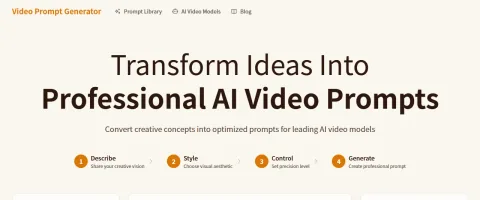
Video Prompt Generator converts rough creative ideas into structured prompts for AI video models. Its guided workflow captures the concept, visual style, and control level, then produces model-friendly prompt text with camera, lighting, atmosphere, and technical instructions. It also includes prompt examples, style templates, and a library aimed at creators, marketers, agencies, and filmmakers.

Also searched as: video prompt generator, ai video prompt generator, sora prompt generator, veo prompt generator

Key Features

Four-step prompt generation workflow
Optimized prompt formats for Sora, Veo, Kling, Runway, and other video models
Style templates for cinematic, sci-fi, nature, product, and 3D animation content
Light control and deep control prompt modes
Prompt library with curated examples
One-click copy workflow
Professional tips for camera, lighting, and scene detail

Overview

Video Prompt Generator converts rough creative ideas into structured prompts for AI video models. Its guided workflow captures the concept, visual style, and control level, then produces model-friendly prompt text with camera, lighting, atmosphere, and technical instructions. It also includes prompt examples, style templates, and a library aimed at creators, marketers, agencies, and filmmakers.

Research Highlights & Evaluation Tips

Video Prompt Generator advertises key functions such as Four-step prompt generation workflow, Optimized prompt formats for Sora, Veo, Kling, Runway, and other video models, Style templates for cinematic, sci-fi, nature, product, and 3D animation content, Light control and deep control prompt modes. These capabilities are pulled directly from the vendor’s public materials so your team can gauge how the platform copes with everyday project requests.

Teams typically deploy Video Prompt Generator for workflows like Sora and Veo prompt writing, Kling and Runway video prompt preparation, Product video concepts. Mapping these scenarios to your current pipeline makes it easier to justify pilot budgets and set measurable KPIs.

Implementation checklist

  • Start with the free allocation to validate output quality and confirm the UI works on the hardware your team carries into the field.
  • Paid options such as Premium unlock higher resolution exports and support commitments—use these tiers when client deliverables demand consistent turnarounds.
  • Document the supported formats (Text ideas, Style selections, Prompt library examples) so your downstream BIM, DCC, or marketing tools can stay in sync without additional conversion steps.
  • Save the vendor’s support channel in your runbook to escalate blockers quickly during time-sensitive submissions.

Best Fit, Tradeoffs, and Alternatives

When to shortlist Video Prompt Generator

  • Video Prompt Generator is most relevant when your team is actively comparing multi-domain ai design options rather than browsing a generic AI directory.
  • Shortlist it for deadlines where turnaround speed matters: the listed workflow expectation is Prompt generation in seconds.
  • Use the free tier first to test output quality, prompt control, and export constraints before adding it to a client-facing workflow.
  • It is especially useful if your pipeline already touches Clipboard copy, Prompt library, AI video model guides.

Questions before adoption

  • Does Video Prompt Generator support the deliverable you need this week, such as Sora and Veo prompt writing or Kling and Runway video prompt preparation?
  • Can the exported files, resolution, and licensing terms survive review by your project lead, broker, or client?
  • Is there a clear owner on your team who will maintain prompts, before/after examples, and accepted output standards?

Technical Specifications

Supported Formats

Text ideasStyle selectionsPrompt library examples

Export Options

Copy-ready text prompts
Collaboration: No
API Available: No
Mobile Support: Yes

Use Cases

Sora and Veo prompt writing
Kling and Runway video prompt preparation
Product video concepts
Cinematic b-roll prompts
Social media video scripts
Agency prompt workflow standardization

Pricing

Free Plan

  • Up to 3 prompts per day
  • Core prompt generator
  • Public prompt examples
Limitations:
  • • Daily prompt limits
  • • Premium library features may require upgrade

Paid Plans

Premium

Premium plan available

Video creators, marketers, and agencies

  • Unlimited generations
  • Prompt history
  • Custom templates
  • Priority support
Billing: monthly
Free trial available

Integrations

Clipboard copy
Prompt library
AI video model guides

Video Prompt Generator FAQ

What is Video Prompt Generator best for?

Video Prompt Generator is best evaluated for Sora and Veo prompt writing, Kling and Runway video prompt preparation, Product video concepts. Compare it against your required deliverable, export quality, and review process before adoption.

Is Video Prompt Generator free or paid?

Video Prompt Generator offers a free option or free starting allocation, but teams should review credit limits, export restrictions, and paid tiers before production use.

What should I compare Video Prompt Generator with?

Compare Video Prompt Generator with Veo4Free, Midjourney, Nano Banana Pro if you want alternatives in the same Multi-domain AI Design category.

Quick Info

Category

General Design Tools

Subcategory

Multi-domain AI Design

Pricing

Paid

Last Updated

2026-05-10

Try Video Prompt Generator

Company Information

Support Options

Documentation

Follow

HTML Sitemap