Archsynth - AI Tool for Architecture & Design

4.70

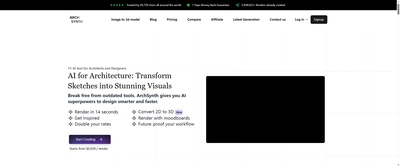
Archsynth is 'The Most Comprehensive AI solution for Architecture and Interior design' that enables users to 'Quadruple your outputs' and 'Create polished Visuals, CAD files, 3D models and renderings in a fraction of the time.' Trusted by 176,582+ users worldwide with 15,698,726+ renders created, Archsynth offers revolutionary features including sketch-to-render in 14 seconds, 2D to 3D conversion, image-to-CAD transformation, and moodboard rendering capabilities that help users 'work at the speed of your ideas' and potentially 'double your rates.'
Key Features

Sketch to Render in 14 seconds
2D to 3D model conversion
Image to CAD transformation
Render with moodboards capability
AI assistant for image analysis
Generate from moodboards (exclusive feature)
Maintain colors from input (exclusive)
Image to 3D conversion (exclusive)
AI Inpainting and Upscaling
Text to Image generation
Edit with Words functionality
Background Removal technology
Fast Rendering speed
Tileable Textures generation
Create Beautiful Illustrations for presentations

Overview

Archsynth is 'The Most Comprehensive AI solution for Architecture and Interior design' that enables users to 'Quadruple your outputs' and 'Create polished Visuals, CAD files, 3D models and renderings in a fraction of the time.' Trusted by 176,582+ users worldwide with 15,698,726+ renders created, Archsynth offers revolutionary features including sketch-to-render in 14 seconds, 2D to 3D conversion, image-to-CAD transformation, and moodboard rendering capabilities that help users 'work at the speed of your ideas' and potentially 'double your rates.'
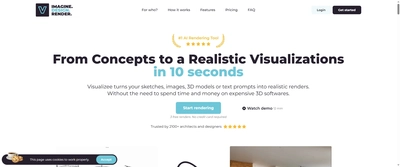
Research Highlights & Evaluation Tips

Archsynth advertises key functions such as Sketch to Render in 14 seconds, 2D to 3D model conversion, Image to CAD transformation, Render with moodboards capability. These capabilities are pulled directly from the vendor’s public materials so your team can gauge how the platform copes with everyday project requests.

Teams typically deploy Archsynth for workflows like Architectural visualization and presentation, Interior design concept development, 2D sketch to 3D model conversion. Mapping these scenarios to your current pipeline makes it easier to justify pilot budgets and set measurable KPIs.

Implementation checklist

  • Start with the free allocation to validate output quality and confirm the UI works on the hardware your team carries into the field.
  • Paid options such as Student Plan, Pro Plan, Studio Plan, Business Plan unlock higher resolution exports and support commitments—use these tiers when client deliverables demand consistent turnarounds.
  • Document the supported formats (Sketch images, CAD files, 3D models, Various image formats) so your downstream BIM, DCC, or marketing tools can stay in sync without additional conversion steps.
  • Save the vendor’s support channel in your runbook to escalate blockers quickly during time-sensitive submissions.

Technical Specifications

Supported Formats

Sketch imagesCAD files3D modelsVarious image formats

Export Options

High-resolution renders3D models for SketchUp, Rhino, Revit, 3ds MaxCAD filesIllustrations

System Requirements

  • • Modern web browser
  • • Internet connection
Collaboration: No
API Available: No
Mobile Support: Yes

Use Cases

Architectural visualization and presentation
Interior design concept development
2D sketch to 3D model conversion
CAD file generation from images
Professional presentations and client proposals
Educational projects and student work
Real estate development visualization
Design portfolio enhancement
Texture creation for 3D models
Virtual staging and interior decoration

Pricing

Free Plan

  • Limited free generations
  • Basic functionality testing
Limitations:
  • • Limited features
  • • Restricted usage

Paid Plans

Student Plan

$10

Students and educational users

  • 200 renders per month
  • All AI tools included (Sketch to Render, Text to Image, Photo Enhancing, Interior Design, Generative Fill, Virtual Staging, AI Landscaping, Image to Video, Image to CAD, Image to 3D, AI Assistant)
  • AI enhancing & masking brush
  • No watermark
  • Educational usage license
  • Commercial use allowed
Billing: monthly

Pro Plan

$24

Individual professionals and freelancers

  • 1000 renders per month
  • All Student Plan features
  • Priority support
  • All core functionalities
  • Commercial usage license
  • Professional access
Billing: monthly

Studio Plan

$49

Small teams and studios

  • 300 render generations per month
  • Team support and multi-user access
  • Advanced customization controls
  • Project folder management
  • Premium features
  • Business usage license
Billing: monthly

Business Plan

$199

Large businesses and enterprises

  • 5000 renders per month
  • Enhanced support
  • Full feature access
  • Enterprise-level functionality
  • Multiple user management
Billing: monthly

Integrations

SketchUp (3D model export)
Rhino (3D model compatibility)
Revit (3D model support)
3ds Max (3D model integration)
Various CAD software compatibility
Web-based platform access

Quick Info

Category

Architecture & Spatial Design

Subcategory

Architectural Visualization & Rendering

Pricing

Paid

Last Updated

2025-10-30

Try Archsynth

Company Information

Founded

2024

176,582+ Trusted Users

Users

140+ countries served

Countries

Support Options

Follow

Accreditations

7 Days Money Back Guarantee
Trusted by prestigious institutions
Market-leading comprehensive AI solution
HTML Sitemap