GoSafety - AI Tool for Architecture & Design

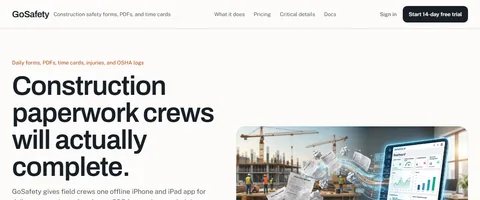
GoSafety is a construction field-operations platform built for contractors that need crews to finish safety paperwork without rebuilding records from paper. The product combines offline iPhone and iPad capture, daily construction safety forms, PDF forms and signatures, time cards, injury records, OSHA 300 / 301 / 300A management, photo and weather capture, web office review, and QuickBooks Online approved-hours export. It is designed for jobsite teams working in poor reception areas while giving office staff clean submission history, signatures, location data, worker-level hours, and exportable records.

Also searched as: gosafety, go safety, gosafety ai, construction safety forms
Key Features

Offline iPhone and iPad app for field crews working in poor reception areas
Daily construction safety forms with weather, photos, notes, diagrams, and worker-level hours
PDF form workflows with fillable PDFs, dictation, graphical signatures, and location stamps
Time cards with optional pre-shift or post-shift safety questions
Injury reporting that carries incident details into OSHA logs
OSHA 300, 301, and 300A form management with annual tracking
QuickBooks Online export for approved hours
AI-assisted or white-glove onboarding for existing PDFs, checklists, diagrams, and signatures

Overview

GoSafety is a construction field-operations platform built for contractors that need crews to finish safety paperwork without rebuilding records from paper. The product combines offline iPhone and iPad capture, daily construction safety forms, PDF forms and signatures, time cards, injury records, OSHA 300 / 301 / 300A management, photo and weather capture, web office review, and QuickBooks Online approved-hours export. It is designed for jobsite teams working in poor reception areas while giving office staff clean submission history, signatures, location data, worker-level hours, and exportable records.

Research Highlights & Evaluation Tips

GoSafety advertises key functions such as Offline iPhone and iPad app for field crews working in poor reception areas, Daily construction safety forms with weather, photos, notes, diagrams, and worker-level hours, PDF form workflows with fillable PDFs, dictation, graphical signatures, and location stamps, Time cards with optional pre-shift or post-shift safety questions. These capabilities are pulled directly from the vendor’s public materials so your team can gauge how the platform copes with everyday project requests.

Teams typically deploy GoSafety for workflows like Daily jobsite safety forms, Construction PDF forms and signatures, Worker time cards and payroll review. Mapping these scenarios to your current pipeline makes it easier to justify pilot budgets and set measurable KPIs.

Implementation checklist

  • Start with the free allocation to validate output quality and confirm the UI works on the hardware your team carries into the field.
  • Paid options such as Up to 15 users, Up to 75 users, Forms Onboarding unlock higher resolution exports and support commitments—use these tiers when client deliverables demand consistent turnarounds.
  • Document the supported formats (PDF forms, Photos, Signatures, Time entries, OSHA logs) so your downstream BIM, DCC, or marketing tools can stay in sync without additional conversion steps.

Technical Specifications

Supported Formats

PDF formsPhotosSignaturesTime entriesOSHA logs

Export Options

PDF recordsQuickBooks Online TimeActivity recordsSubmission history

System Requirements

  • • iPhone or iPad for field capture
  • • Web browser for office review
Collaboration: Yes
API Available: No
Mobile Support: Yes

Use Cases

Daily jobsite safety forms
Construction PDF forms and signatures
Worker time cards and payroll review
Injury reports and OSHA recordkeeping
Offline field capture on remote jobsites
QuickBooks Online approved-hours export
Office review of photos, signatures, weather, and submission history

Pricing

Free Plan

  • 14-day free trial
  • No credit card required
  • Core workflows for forms, PDFs, time cards, injuries, OSHA logs, and offline capture
Limitations:
  • • Trial limited to 14 days

Paid Plans

Up to 15 users

$50/month

Small construction crews

  • Daily forms
  • PDF forms and signatures
  • Time cards
  • Injury forms
  • OSHA logs
  • Offline capture
Billing: monthly

Up to 75 users

$100/month

Larger crews and contractors

  • All core construction safety workflows
  • Office review
  • Approved-hours review
  • QuickBooks Online export
  • Flat company-size pricing
Billing: monthly

Forms Onboarding

$300

Companies moving existing paperwork into GoSafety

  • AI-assisted or hands-on setup
  • Existing PDFs and checklists imported
  • Diagram and signature workflow setup
Billing: onetime
Free trial available

Integrations

iPhone and iPad app
Web office review
QuickBooks Online
PDF form workflows
App Store distribution

Quick Info

Category

Architecture & Spatial Design

Subcategory

Construction Safety & Field Operations

Pricing

Paid

Last Updated

2026-05-23

Try GoSafety

Company Information

Support Options

Related Tools

Discover more Construction Safety & Field Operations tools in Architecture & Spatial Design

HTML Sitemap