Visoid - AI Tool for Architecture & Design

4.50

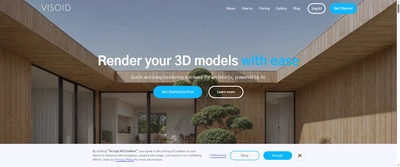
Visoid is 'Quick and easy rendering software for architects, powered by AI' that enables users to 'Render your 3D models with ease' and 'Bring your 3D models to life' in seconds. Developed by an Oslo-based team with backgrounds in both architecture and technology, Visoid delivers 'coherent, high quality visualizations in a matter of seconds' while cutting visualization time by up to 90%. The platform offers flexible plugin or image-based inputs, making it compatible with any 3D design application on the market and enabling architects to 'create content in a matter of hours that would have cost thousands of dollars and weeks to create.'
Key Features

Simple and fast 3D model rendering in seconds
Material experimentation and design alternatives testing
Lighting and seasonal variations for project showcasing
Flexible plugin or image-based input compatibility
Works with any 3D design application on the market
Alternative workflows: enhance existing renderings, render collages
3-step rendering process: Set up → Export → Render
Video export capabilities (Premium plan)
3D model upload functionality
Multi-prompt support for creative exploration
MaterialID control for precise material adjustments
Post-production enhancement for Twinmotion, Enscape, 3ds Max

Overview

Visoid is 'Quick and easy rendering software for architects, powered by AI' that enables users to 'Render your 3D models with ease' and 'Bring your 3D models to life' in seconds. Developed by an Oslo-based team with backgrounds in both architecture and technology, Visoid delivers 'coherent, high quality visualizations in a matter of seconds' while cutting visualization time by up to 90%. The platform offers flexible plugin or image-based inputs, making it compatible with any 3D design application on the market and enabling architects to 'create content in a matter of hours that would have cost thousands of dollars and weeks to create.'
Research Highlights & Evaluation Tips

Visoid advertises key functions such as Simple and fast 3D model rendering in seconds, Material experimentation and design alternatives testing, Lighting and seasonal variations for project showcasing, Flexible plugin or image-based input compatibility. These capabilities are pulled directly from the vendor’s public materials so your team can gauge how the platform copes with everyday project requests.

Teams typically deploy Visoid for workflows like Architectural visualization and concept development, Design iteration and material exploration, Client presentations and convincing visualizations. Mapping these scenarios to your current pipeline makes it easier to justify pilot budgets and set measurable KPIs.

Implementation checklist

  • Start with the free allocation to validate output quality and confirm the UI works on the hardware your team carries into the field.
  • Paid options such as Pro, Premium unlock higher resolution exports and support commitments—use these tiers when client deliverables demand consistent turnarounds.
  • Document the supported formats (Image uploads, 3D model files via plugin, Enhanced renders) so your downstream BIM, DCC, or marketing tools can stay in sync without additional conversion steps.
  • Save the vendor’s support channel in your runbook to escalate blockers quickly during time-sensitive submissions.

Technical Specifications

Supported Formats

Image uploads3D model files via pluginEnhanced renders

Export Options

Up to 4K resolutionVideo exportStandard resolution 1kMedium resolution up to 2k

System Requirements

  • • Modern web browser
  • • Internet connection
Collaboration: No
API Available: Yes
Mobile Support: No

Use Cases

Architectural visualization and concept development
Design iteration and material exploration
Client presentations and convincing visualizations
Early-stage storytelling for projects
Marketing materials and portfolio enhancement
Post-production enhancement of existing renderings
Site photo integration and collage rendering
Educational projects and student work

Pricing

Free Plan

  • 30 renders per month
  • Standard resolution 1k
  • Personal license for single user
  • No credit card needed
Limitations:
  • • Limited to 30 renders/month
  • • Standard resolution only

Paid Plans

Pro

$29

Individual architects needing quick visualization

  • 1000 renders per month
  • Medium resolution up to 2k
  • Personal license for single user
  • For quickly visualizing your design
Billing: monthly

Premium

$59

Professional visualization work

  • 3000 renders per month
  • High resolution up to 4k
  • Video export
  • 3D model upload
  • Multi-prompt support
  • Material control with MaterialID
  • Always up-to-date with latest features
  • Personal license for single user
Billing: monthly

Integrations

Any 3D design application via image input
Plugin integration for direct import
Twinmotion enhancement workflow
Enscape post-production
3ds Max rendering improvement
Photoshop collage rendering

Quick Info

Category

Architecture & Spatial Design

Subcategory

Architectural Visualization & Rendering

Pricing

Paid

Last Updated

2025-10-30

Try Visoid

Company Information

Founded

Oslo-based team

Headquarters

Oslo, Norway

Support Options

Follow

HTML Sitemap