Introduction: Why Every Architect Must Master AI in 2025?
The architecture industry is facing unprecedented challenges in 2025. Project timelines are shrinking, client expectations are rising, and design complexity is increasing. Architects today are under pressure to deliver more concept variations, faster visualizations, and better analysis—all while maintaining design quality and managing costs.
But here's the crucial insight: AI isn't here to replace architects. Instead, it serves as a powerful accelerator that helps architects:
- Generate concept directions faster – Explore multiple design options in minutes instead of days
- Create visualizations instantly – Transform sketches into photorealistic renders in seconds
- Analyze designs intelligently – Optimize layouts, test configurations, and evaluate performance
The question is no longer if architects should adopt AI, but how to integrate these tools effectively into their workflow.
👉 If you're ready to explore current AI architecture tools, visit our comprehensive tool navigation: ArchAITool.com
Step 1: Understanding AI's 4 Core Applications in Architecture
Before diving into specific tools, let's establish a clear understanding of how AI is actually being used in architectural practice today. Based on the tools currently available, AI serves four primary functions in the architecture workflow:
1. Concept Design Generation
This is the most popular and accessible AI application for architects. AI-powered concept generation tools transform text descriptions into visual building concepts, allowing rapid exploration of design directions.
How it works: You provide descriptive text (prompts) about building type, style, materials, and context, and the AI generates multiple visual concepts.
Available tools: AI Architectures (Free), Maket AI, Arkdesign AI
Best for: Early-stage concept exploration, client presentations, and design inspiration.
2. Floor Planning & Layout Optimization
AI tools in this category focus on creating efficient, functional floor plans based on parameters like building type, space requirements, and design constraints.
How it works: Input your requirements (square footage, room types, adjacencies) and the AI generates optimized layout options.
Available tools: TestFit, Floorplan AI, AI Architectures
Best for: Space planning efficiency, feasibility studies, and rapid iteration on building layouts.
3. Visualization & Rendering
AI-powered visualization tools can transform sketches, models, or even text descriptions into photorealistic architectural visualizations in a fraction of traditional rendering time.
How it works: Upload your design files (sketches, models, or images) and the AI enhances them into professional-quality renders.
Available tools: MyArchitect AI, Visualizee AI, Arko AI
Best for: Client presentations, design development, and portfolio creation.
4. Interior Design
AI interior design tools focus on creating and furnishing interior spaces, often with the ability to generate realistic room designs from photos or descriptions.
How it works: Upload room photos or provide descriptions, and the AI generates complete interior design schemes with furniture, materials, and lighting.
Available tools: Home Design AI (Free), RoomGPT, Arch E AI
Best for: Interior space planning, material selection, and creating complete interior design presentations.
Step 2: Starting with Concept Generation (5-Minute Tutorial)
Let's get hands-on immediately. The fastest way to experience AI in architecture is through concept generation tools. Here's a practical 5-minute tutorial using one of the best free tools available:
Free Tool Recommendation: AI Architectures
Why AI Architectures? It's completely free, web-based (no installation), specifically designed for architects, and produces professional-quality results in seconds.
5-Minute Workflow:
- Visit AI Architectures – Open your browser and navigate to the platform
- Write Your First Prompt – Example: "Modern office building with glass curtain wall, sustainable design, 5 floors, minimalist aesthetic, natural lighting integration"
- Generate Concepts – Click generate and receive multiple design options within 10 seconds
- Download Your Best Option – Choose the concept that best fits your vision
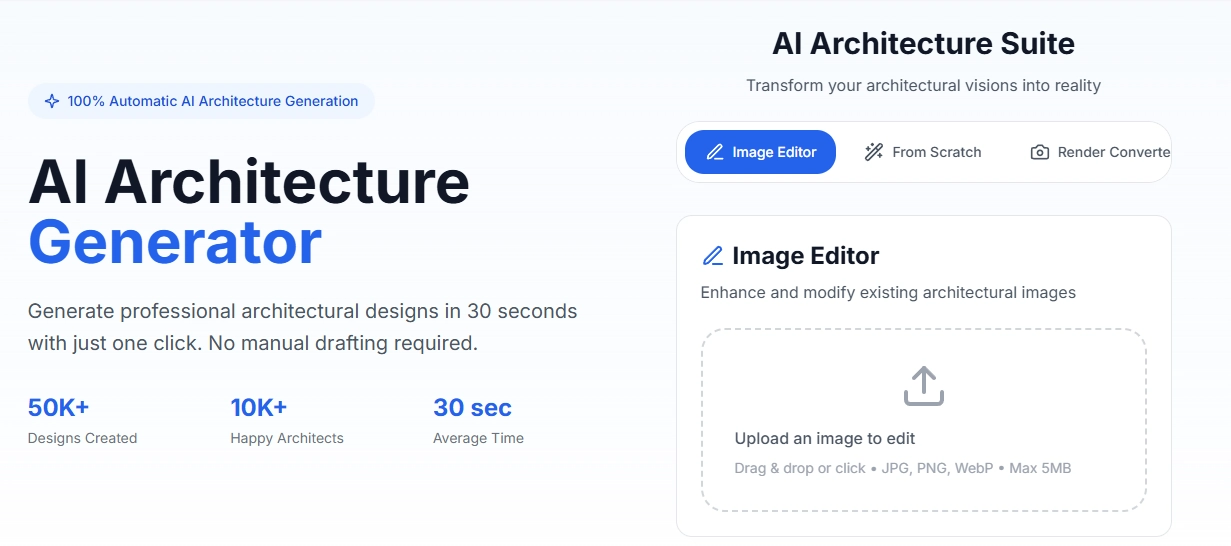
AI Architectures interface showing concept generation from text prompts
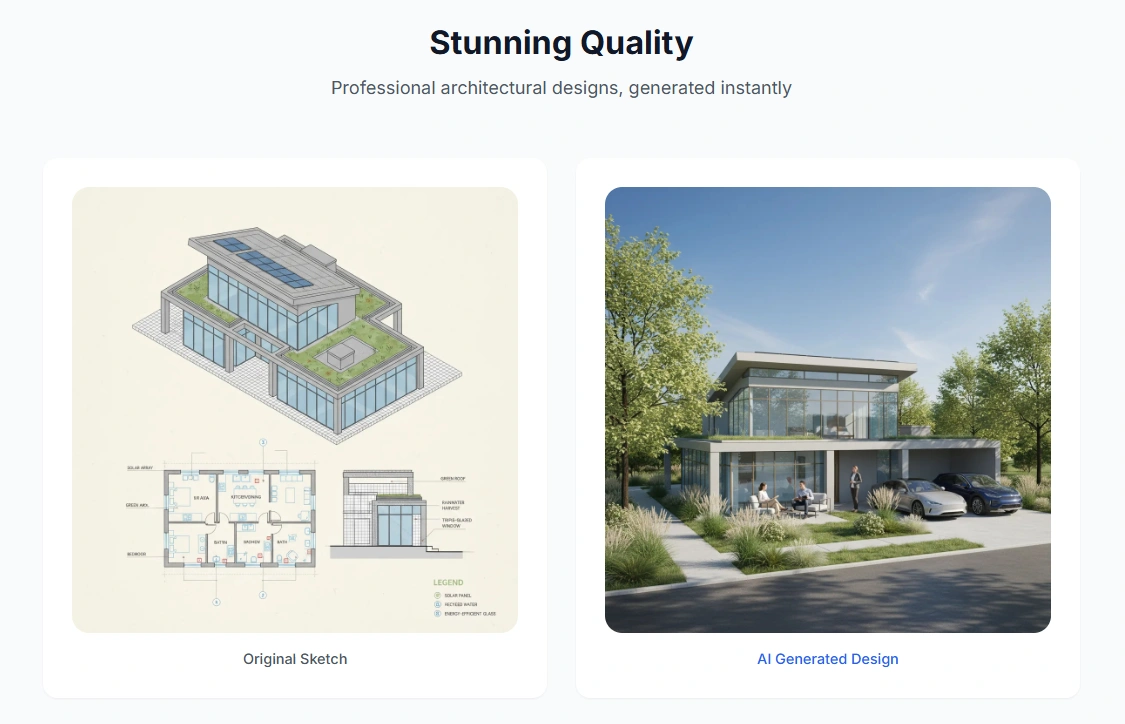
AI-generated architectural design variations showcasing different styles and approaches
Professional Prompt Template:
"A modern [building type] with [key features], [architectural style], [material emphasis], [special requirements], 16:9 aspect ratio"
Try These Variations:
- "Sustainable residential complex with vertical gardens, solar panel integration, community spaces, warm natural materials"
- "Minimalist commercial building with dramatic cantilever, glass facade, underground parking, urban context"
- "Mixed-use development with retail ground floor, office spaces above, public plaza, green roof design"
👉 Ready to try more concept generation tools? Explore our complete concept design tools collection
Step 3: Choosing Tools That Actually Help You
With dozens of AI tools available, how do you select the right ones for your specific needs? Here's a practical evaluation framework based on four key dimensions:
1. Professional Quality vs. Speed Trade-off
High Speed (10-60 seconds): MyArchitect AI, AI Render Studio – Perfect for rapid iteration and client feedback
High Professional Quality: Arko AI, Autodesk Forma – Best for final presentations and detailed development
Your choice depends on project stage. Use fast tools for exploration, professional tools for final deliverables.
2. Ease of Use vs. Professional Control
Easy to Use (One-click): AI Architectures, RoomGPT – Ideal for beginners and rapid concepting
Advanced Control: TestFit, Bricsys BIM – Suitable for experienced professionals needing precise control
Start with easy tools to build confidence, then gradually move to more advanced options as needed.
3. Cost Consideration
Free Options: AI Architectures, Home Design AI, ReimagineHome AI
Paid Tools: Most professional tools require subscription (typically $20-100/month)
Begin with free tools to understand AI capabilities before investing in paid solutions.
4. Output Usability
Presentation-Ready: MyArchitect AI, Visualizee AI – Direct client presentations
Development-Ready: Autodesk Forma, Bricsys BIM – Can be integrated into professional workflows
Consider whether you need quick presentation images or files that can be integrated into your BIM/CAD workflow.
AI Architecture Tools: Professional Assessment Matrix
| Category | Professional Quality | Control | Speed | Usability |
|---|---|---|---|---|
| Concept Design Generation | ||||
| AI Architectures (Free) | ⭐⭐⭐ | ⭐⭐⭐⭐ | ⭐⭐⭐⭐⭐ | ⭐⭐⭐ |
| Maket AI | ⭐⭐⭐⭐ | ⭐⭐⭐ | ⭐⭐⭐⭐ | ⭐⭐⭐⭐ |
| Arkdesign AI | ⭐⭐⭐⭐⭐ | ⭐⭐⭐⭐ | ⭐⭐⭐ | ⭐⭐⭐⭐⭐ |
| Floor Planning & Layout | ||||
| TestFit | ⭐⭐⭐⭐⭐ | ⭐⭐⭐⭐⭐ | ⭐⭐⭐⭐ | ⭐⭐⭐⭐⭐ |
| Floorplan AI | ⭐⭐⭐ | ⭐⭐⭐ | ⭐⭐⭐⭐⭐ | ⭐⭐⭐ |
| AI Architectures (Free) | ⭐⭐⭐ | ⭐⭐ | ⭐⭐⭐⭐⭐ | ⭐⭐⭐ |
| Visualization & Rendering | ||||
| MyArchitect AI | ⭐⭐⭐⭐ | ⭐⭐⭐ | ⭐⭐⭐⭐⭐ | ⭐⭐⭐⭐ |
| Arko AI | ⭐⭐⭐⭐⭐ | ⭐⭐⭐⭐⭐ | ⭐⭐⭐ | ⭐⭐⭐⭐⭐ |
| Visualizee AI | ⭐⭐⭐ | ⭐⭐⭐ | ⭐⭐⭐⭐ | ⭐⭐⭐⭐ |
| Interior Design | ||||
| Home Design AI (Free) | ⭐⭐⭐ | ⭐⭐⭐ | ⭐⭐⭐⭐⭐ | ⭐⭐⭐ |
| RoomGPT | ⭐⭐ | ⭐⭐ | ⭐⭐⭐⭐⭐ | ⭐⭐ |
| Arch E AI | ⭐⭐⭐⭐ | ⭐⭐⭐⭐ | ⭐⭐⭐ | ⭐⭐⭐⭐ |
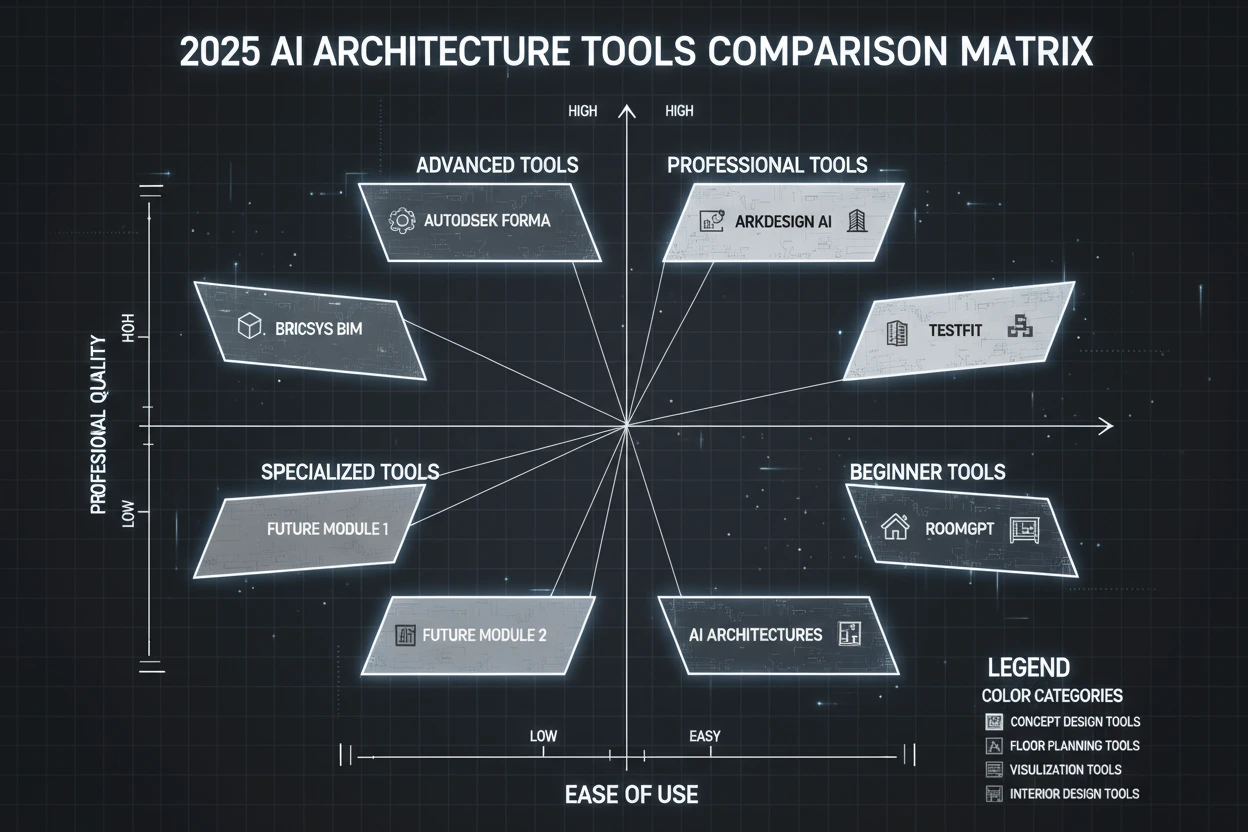
Comprehensive comparison matrix of the top 10 AI architecture tools for 2025
Pro Tips: Choosing & Using AI Architecture Tools
💡 Assessment Criteria:
- Professional Quality: Architectural accuracy and technical precision
- Control: User's ability to customize and refine outputs
- Speed: Time efficiency from input to final result
- Usability: Direct application in professional workflows
🎯 Selection Recommendations:
- For Beginners: AI Architectures + Home Design AI (both free)
- For Efficiency: MyArchitect AI + TestFit
- For Professional Output: Arko AI + Arkdesign AI
👉 Explore complete tool directory with detailed reviews: ArchAITool.com
Tool Recommendations by Need:
- For concept exploration: AI Architectures + Midjourney
- For layout optimization: TestFit + Floorplan AI
- For final visualization: MyArchitect AI + Arko AI
- For interior design: Home Design AI + RoomGPT
Step 4: Integrating AI into Your Daily Design Workflow
The real power of AI comes from integrating it into your existing workflow. Here's a practical example showing how AI can transform a typical architectural project:
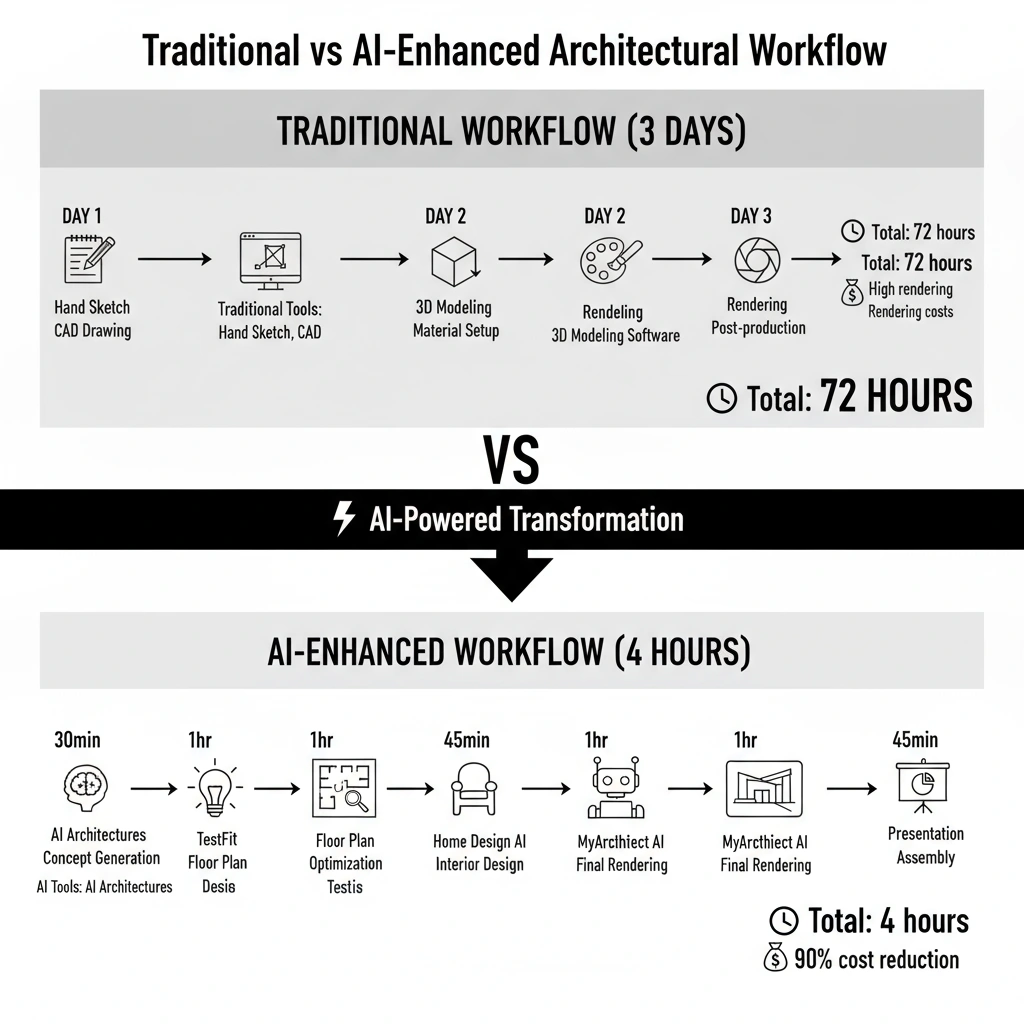
Traditional vs AI-Enhanced Architectural Workflow: Time and efficiency comparison
Case Study: Small Office Building Design
Traditional Workflow (3 days):
- Hand sketch concepts (Day 1)
- CAD modeling and basic 3D (Day 2)
- Rendering and post-production (Day 3)
- Total: 72 hours, significant rendering costs
AI-Enhanced Workflow (4 hours):
- AI Architectures → Generate 5 concept options in 30 minutes
- TestFit → Optimize floor plan and space efficiency in 1 hour
- Home Design AI → Design interior spaces and material palette in 45 minutes
- MyArchitect AI → Create photorealistic exterior renders in 1 hour
- Presentation Assembly → Compile AI outputs into professional presentation in 45 minutes
- Total: 4 hours, 90% cost reduction
Efficiency Improvements:
- Concept Phase: 80% time reduction – from days to minutes
- Rendering Phase: 90% time reduction – from hours to seconds
- Overall Project: 75% time savings while maintaining or improving quality
Recommended Tool Combinations:
For Small Projects: AI Architectures + MyArchitect AI (Free + $29/month)
For Medium Projects: Add TestFit + Home Design AI for comprehensive workflow
For Large Projects: Include Autodesk Forma + Arko AI for professional integration
👉 All mentioned tools are available in our comprehensive directory: ArchAITool.com
Step 5: Avoiding 4 Common AI Mistakes Architects Make
As AI becomes more prevalent, architects often fall into common pitfalls. Understanding these mistakes will help you use AI more effectively and professionally:
Mistake 1: Treating AI Images as "Buildable Solutions"
The Problem: Architects sometimes present AI-generated concepts as if they're fully engineered, buildable designs.
The Reality: AI excels at generating visual concepts, but it doesn't understand structural requirements, building codes, material properties, or construction feasibility.
The Solution: Use AI for concept exploration and visualization, but always conduct proper technical analysis and feasibility studies before treating designs as buildable.
Mistake 2: Assuming "More Tools = Better Results"
The Problem: Many architects try to use every new AI tool they discover, resulting in workflow complexity and inconsistent outputs.
The Reality: Mastering 2-3 core tools is more valuable than superficial familiarity with 10+ tools.
The Solution: Start with 1-2 free tools (AI Architectures + Home Design AI), master them, then gradually add specialized tools based on project needs.
Mistake 3: Thinking AI Replaces Design Thinking
The Problem: Some architects believe AI can handle the creative process, reducing their role to prompt writing.
The Reality: AI generates variations and options, but the architect remains the design decision-maker. Your expertise in context, user needs, and design intent is irreplaceable.
The Solution: Treat AI as a collaborative tool that enhances your creativity, not replaces it. You provide the vision; AI provides the execution support.
Mistake 4: Not Building a Personal Prompt Library
The Problem: Starting from scratch with every project leads to inconsistent results and wasted time reinventing effective prompts.
The Reality: Effective prompts are reusable assets that improve over time.
The Solution: Create a personal prompt library organized by:
- Building Types: Residential, Commercial, Institutional, Mixed-use
- Architectural Styles: Modern, Traditional, Sustainable, Minimalist
- Project Phases: Concept, Development, Presentation
- Client Types: Corporate, Residential, Public Sector
Conclusion: Tailored Advice for Different Architects
The path to AI adoption varies based on your professional context. Here's specific guidance for different architect profiles:
For Architecture Students:
Start with free tools to build your AI literacy. Focus on AI Architectures to understand how AI can enhance your design process. Use AI to create impressive portfolio pieces that demonstrate your understanding of cutting-edge technology.
For Small Firm Architects:
Focus on efficiency and client presentation tools. MyArchitect AI + TestFit combination offers the best ROI for small practices. Start with one paid tool and master it before expanding your toolkit.
For Large Firm Professionals:
Emphasize integration with existing BIM workflows. Autodesk Forma and Arko AI offer professional-grade integration with tools you already use. Focus on how AI can enhance team collaboration and deliver better results to clients.
The future of architecture is already here – it's just being adopted unevenly. By starting your AI journey today, you're positioning yourself at the forefront of architectural practice.
👉 Ready to begin your AI architecture journey? Explore our complete tool directory with detailed reviews, comparisons, and implementation guides: ArchAITool.com